Quarterly compliance report and annual letter
Two documents your program file should always have.
Applies to: Gateway, Hosted
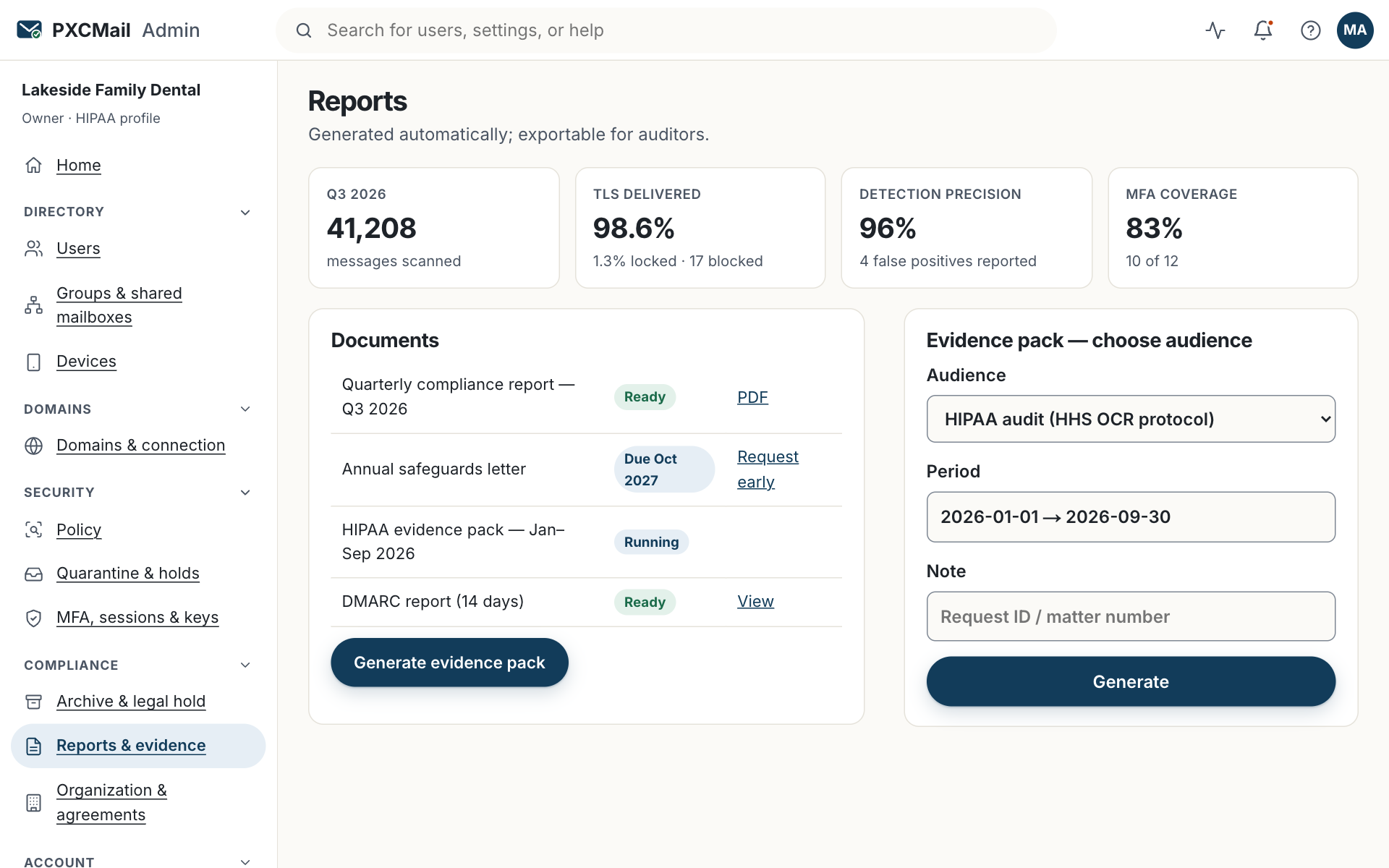
The quarterly report under Console → Reports summarizes what the email controls did over the period; the annual letter is PXCMail’s signed statement of the safeguards we maintain as your service provider. File both with your risk analysis or WISP.
Before you start
- Compliance, Admin or Owner role. Compliance is read-only and can download both documents.
- Know where your program file lives (risk analysis for HIPAA, WISP for the FTC Safeguards Rule, compliance manual for an RIA) so the PDFs go in the same place every quarter.
- Your agreement anniversary, shown under Console → Organization → Agreements; the annual letter is tied to it.
Steps
- Console → Reports → Quarterly. The report for the last full quarter is generated automatically in the first days of the new quarter and listed by period.
- Read the sections: messages scanned, TLS delivery rate, locked deliveries, warn, hold and block counts by rule, policy changes with version numbers, user and MFA coverage, DNS health, and incidents in the period.
- Download the PDF. Name it with the period and file it in your program folder.
- Console → Reports → Annual letter. It is generated on your agreement anniversary; ask support to generate it early if an audit, carrier questionnaire or exam arrives first. The letter is signed by PXCMail’s Security Officer and dated.
- Add a line to your risk analysis or WISP with the review date and anything you changed as a result, such as enrolling a user the report showed without MFA.
Verify
Reports lists the quarterly report with its period and generation date, and the annual letter with its signature date. The audit log records each download with the user’s name.
Troubleshooting
- No quarterly report is listed yet. Cause: your organization has not completed a full calendar quarter. Fix: use the 30- and 90-day summaries under Reports until then.
- The MFA coverage figure looks wrong. Cause: synced users who have not signed in yet. Fix: compare with Users & devices; shared mailboxes are not seats and are not counted.
- The annual letter is dated for last year. Cause: the new one has not generated yet because your anniversary is still ahead. Fix: ask support for an early letter; it replaces the listing when signed.
- An insurer wants more than the letter. Cause: carrier questionnaires ask for specifics such as MFA enforcement. Fix: generate an evidence pack for the cyber-insurance audience.
Example
Ortiz CPA, a 9-person tax firm on Microsoft 365, keeps a WISP based on the IRS template for its PTIN renewal. Each January, April, July and October partner Daniel Ortiz downloads the quarterly report and files it behind the WISP’s service-provider section, which satisfies the periodic assessment of service providers in 16 CFR 314.4(f). The annual letter arrives in March on the firm’s agreement anniversary and goes in the same folder. When the firm’s cyber carrier asked for proof of encryption in transit, Daniel sent the latest report’s TLS rate and the letter.
FAQ
Is the quarterly report evidence of compliance?
It is evidence that the email controls ran and what they did. Your program as a whole is what compliance rests on; the report covers the email part.
Can my auditor or MSP receive the report automatically?
A Partner sees every client’s reports in the Partner console. For an outside auditor, send the PDF as a secure message or give them a Compliance role for the engagement.
What does the annual letter actually say?
That PXCMail maintains the safeguards described in your agreement, with the controls listed and the date, signed by our Security Officer. It does not say that your organization is compliant.
Where is the SOC 2 report?
SOC 2 Type I is on the roadmap, not live. Until then we provide the annual letter, the security overview and the evidence pack.
Related
Still stuck? A human answers within 15 minutes on chat, 1 hour by email during business hours (24/7 for outages).