DNS setup
The console generates exact records; this page explains what each does so you can add them with confidence — or book a 15-minute DNS call.
Applies to: Gateway, Hosted
PXCMail needs five kinds of DNS records: SPF so receivers accept mail relayed through us, DKIM so it carries your domain’s signature, a MAIL FROM subdomain so SPF aligns for DMARC, MX only if inbound mail should come to us, and DMARC so you can see who sends as your domain.
Before you start
- Login to your registrar or DNS host, or your IT partner’s help.
- The records from Console → Domains & connection; copy them from there, because the DKIM selectors are specific to your organization.
- Your current SPF record. Count its
include:entries; the limit is 10 DNS lookups and the PXCMail include uses one.
Steps
- SPF (TXT at
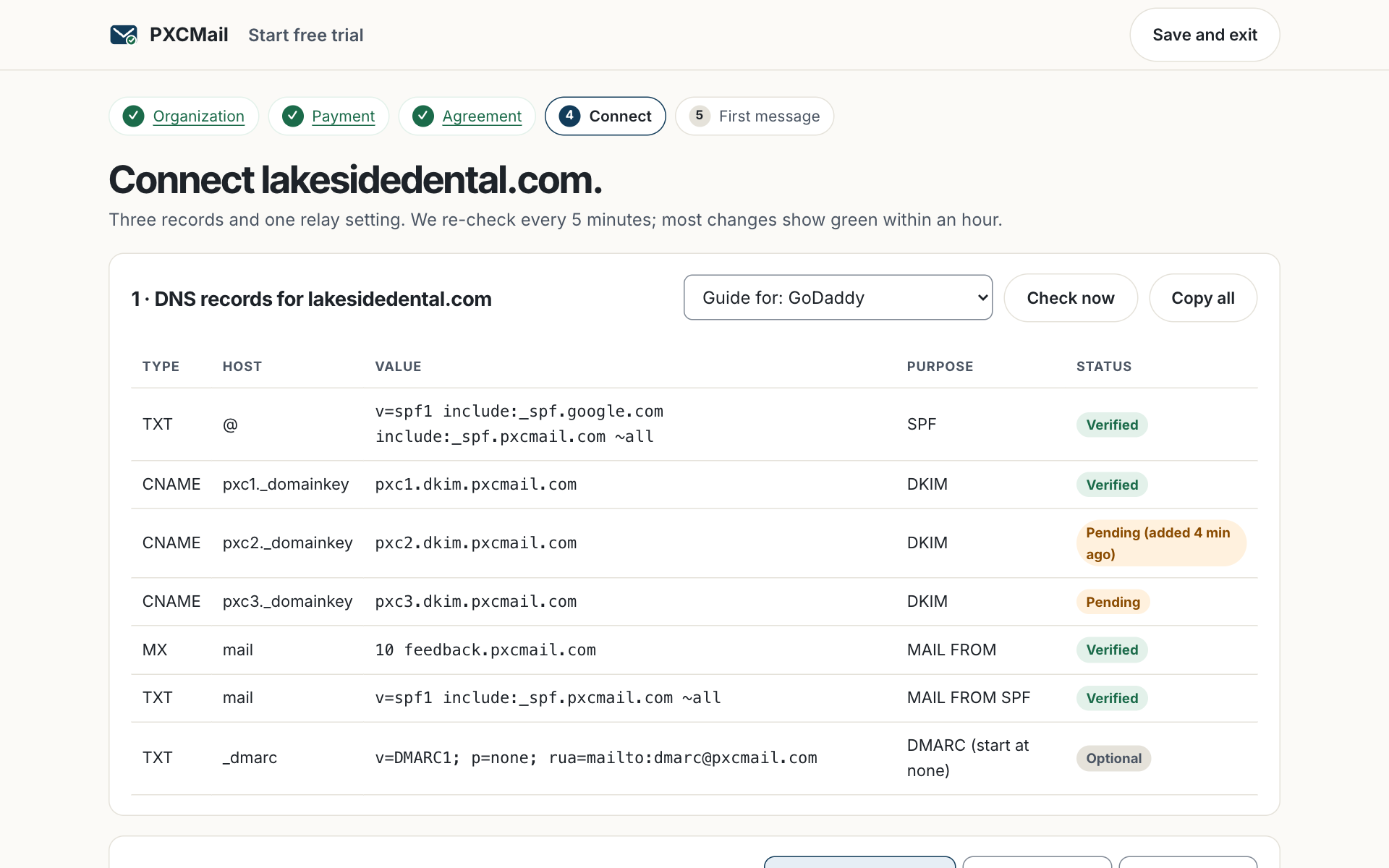
@): addinclude:_spf.pxcmail.comto your existing record, for examplev=spf1 include:_spf.google.com include:_spf.pxcmail.com ~all. One SPF record per domain, never two. - DKIM: three CNAME records, for example
pxc1._domainkey → pxc1.dkim.pxcmail.com. We sign with your domain so reputation stays yours. - MAIL FROM (a subdomain such as
mail.yourpractice.com): one MX and one TXT record from the console so the bounce address aligns with your domain for DMARC. - MX (optional on Gateway, required on Hosted):
10 mx1.pxcmail.com,20 mx2.pxcmail.com. On Gateway, add them only with inbound filtering. - DMARC (TXT at
_dmarc): start withv=DMARC1; p=none; rua=mailto:[email protected]. Move to quarantine and then reject when the DMARC dashboard shows only legitimate sources. - Registrar notes. GoDaddy: My Products → DNS → Add record. Cloudflare: DNS → Records; set mail records to “DNS only”. Google Domains/Squarespace: DNS → Custom records. Namecheap: Advanced DNS.
Verify
The console re-checks every five minutes and turns each record green. Most changes propagate within an hour; some registrars take up to 24. When all are green, press Send test; the audit trail shows TLS ✓, DKIM ✓ and SPF aligned.
Troubleshooting
- SPF “too many lookups”. Cause: more than 10 includes, often from old marketing tools. Fix: remove includes you no longer use; we can help flatten the rest.
- DKIM still red after an hour. Cause: a trailing dot, a copied space, or a host entered with the domain repeated. Fix: enter only
pxc1._domainkeyas the host. - Cloudflare record proxied. Cause: the orange cloud is on. Fix: switch mail records to “DNS only”; proxied CNAMEs do not resolve for mail.
- Two SPF records. Cause: a second TXT was added instead of editing the first. Fix: merge into one; receivers treat two as a failure.
- MX changed too early on Gateway. Cause: MX added before inbound filtering was enabled. Fix: remove it, or enable inbound filtering first.
Example
Lakeside Family Dental is on Google Workspace with a Squarespace-managed domain. The office manager edits the existing SPF to add the PXCMail include next to Google’s, adds the three DKIM CNAMEs and the MAIL FROM pair, and publishes DMARC at p=none. She leaves MX alone because the practice uses Gateway without inbound filtering. The wizard turns green within the hour. Three weeks later the DMARC dashboard shows Google, PXCMail and the Dentrix reminder service as the only senders, so she moves to p=quarantine.
FAQ
Will my existing Google or Microsoft mail break while I do this?
No. SPF, DKIM, MAIL FROM and DMARC records change nothing about how mail flows today. Only MX moves delivery, and on Gateway that is optional.
Why does PXCMail sign with my domain instead of its own?
So recipients see mail from you, not “via pxcmail.com”, and your sending reputation accrues to you.
Can you add the records for us?
Yes. Book the DNS call from the console or give your IT partner access; MSPs see DNS health for every client in the partner console.
Related
Still stuck? A human answers within 15 minutes on chat, 1 hour by email during business hours (24/7 for outages).