DNS checks show red
Red usually means a typo or propagation. Here is each record’s common fix.
Applies to: Gateway, Hosted
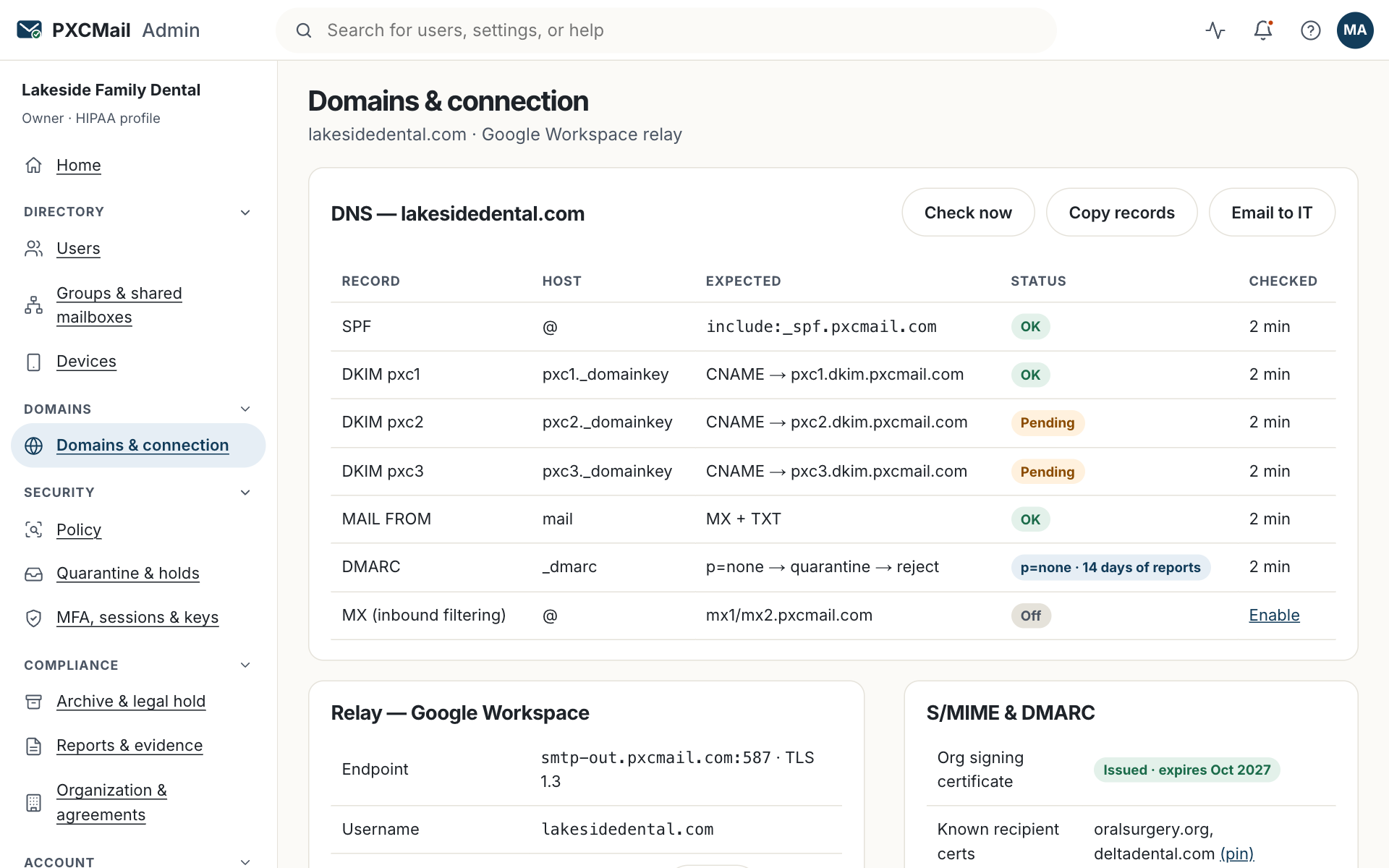
Each red check under Console → Domains & connection names one record and why it failed. Nearly every case is a typo, a duplicate record, a proxy left on, or a change that has not propagated. Fix the record at your DNS host; the wizard re-checks every 5 minutes.
Before you start
- A login to wherever your DNS lives (registrar, Cloudflare, website host). It is often not where you bought the domain.
- Console → Domains & connection open in another tab; each row has a copy button.
- Do not delete records you cannot explain. Add or edit only the ones named in the check.
Steps
- SPF. Red means more than 10 DNS lookups, a missing include, or two SPF records. A domain may have only one; merge the includes and remove senders you no longer use.
- DKIM. Red means the CNAME target has a trailing dot or space, the selector name is wrong, or a proxy (Cloudflare’s orange cloud) sits in front of it. Set the record to DNS only and paste the target exactly.
- MAIL FROM. Red means the bounce subdomain is missing its MX or TXT record. Both must point at our servers so SPF aligns with your domain.
- MX. Only checked when you route inbound through PXCMail or use Hosted. Red means the old provider’s MX still has a higher priority or the TTL has not expired.
- DMARC. Red means a syntax error (missing semicolons, wrong tag) or a policy stricter than your sources can pass. Start at
p=noneand read the DMARC dashboard before tightening. - Click Re-check, or wait for the automatic check.
Verify
All rows green. Send a test message to an outside address and open its headers: you want spf=pass, dkim=pass and dmarc=pass. Console → Reports → DMARC shows the message as passing.
Troubleshooting
- Still red an hour after the change. Cause: the old record’s TTL has not expired, so resolvers still see it. Fix: wait it out; lower the TTL before your next change.
- Green yesterday, red today. Cause: someone added a second SPF record for a new tool, or a host migration rewrote records. Fix: the DNS drift alert names the record; merge or restore it.
- SPF says “too many lookups”. Cause: each include counts and tools add up. Fix: remove retired senders; route the rest through your provider so they inherit your policy.
- DKIM red only on Cloudflare. Cause: the CNAME is proxied. Fix: click the orange cloud to make it grey.
- MX red on Gateway without inbound routing. Cause: the check applies to inbound MX. Fix: leave MX at your provider; the row is informational until inbound routing is on.
Example
Lakeside Family Dental runs Google Workspace with DNS at Cloudflare. After signup, DKIM and SPF are red. The office manager opens Cloudflare: the DKIM CNAME is proxied, and SPF exists twice, one record from Google and one left by a website-form plugin. She sets the CNAME to DNS only and merges the two SPF records into one. Five minutes later both rows are green, and a test sent from frontdesk@ shows all three passes in its headers.
FAQ
Does mail stop while a check is red?
No. Your provider keeps sending. Until DKIM and MAIL FROM are green, messages relayed through PXCMail may fail authentication at strict recipients, so fix it the same day.
Can PXCMail make the DNS changes for me?
We walk you through it on a call and verify live. We never hold your registrar login.
We have several domains. Do all of them need records?
Every domain you send from needs SPF, DKIM and MAIL FROM. Domains used only for the website need nothing.
Why does the console disagree with another DNS checker?
Checkers use different resolvers and caches. The console re-checks every 5 minutes.
Related
Still stuck? A human answers within 15 minutes on chat, 1 hour by email during business hours (24/7 for outages).