Review quarantine and held messages
Held items wait for a human; nothing is lost and everything is logged.
Applies to: Gateway, Hosted
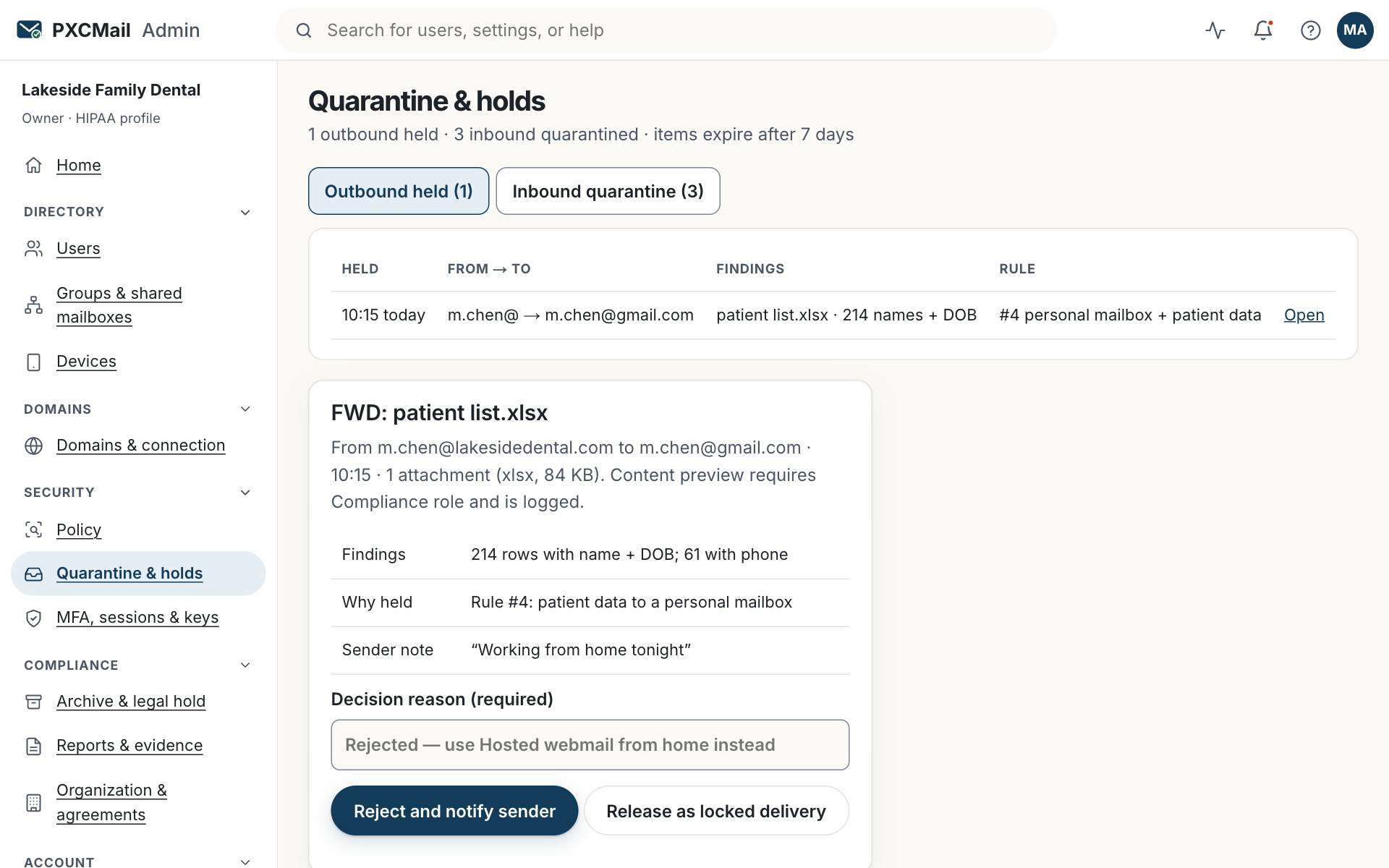
Console → Quarantine & holds shows outbound messages stopped by a hold rule and inbound mail quarantined as impersonation, spam or malware. A Compliance, Admin or Owner user releases or rejects each one with a reason; the sender is told, the recipient sees nothing until release, and every decision lands in the audit log.
Before you start
- Compliance, Admin or Owner to release or reject. Support can view metadata only.
- Know which rules use the hold action (Console → Policy). Hold is one of five actions, beside deliver, encrypt, warn and block.
- Decide who is alerted when something is held; set it under Console → Alerts.
Steps
- Console → Quarantine & holds. The Outbound tab lists messages held by policy with sender, recipients, rule and findings. The Inbound tab lists suspected phishing, lookalike domains and malware (only when inbound routing is on).
- Open an item. Findings are shown as counts, for example “SSN ×2, W-2 fingerprint”. A content preview requires Compliance or Owner and is logged with a reason.
- Choose Release (deliver over TLS as sent), Release as locked delivery (recipient opens with a one-time code), or Reject. A reason is required for each.
- The sender receives a short notice of the outcome. On inbound items, Release delivers to the mailbox with the warning banner still attached; Delete removes it.
- Items expire after 7 days (configurable under Policy → Hold settings). An expired item counts as rejected and the sender is notified.
Verify
The queue is empty or contains only items awaiting review. Console → Archive & audit → Audit log shows each decision with the reviewer, the reason and, for releases, the delivery result.
Troubleshooting
- A message you expected to be held was delivered. Cause: the rule is in test mode, a higher rule matched first, or an exception applied. Fix: check Console → Policy → Versions and the message’s audit record, which names the rule that decided.
- Nobody noticed a held message for days. Cause: only the sender was notified. Fix: add a Compliance alert for holds under Console → Alerts.
- Release button is greyed out. Cause: your role is Support or User. Fix: ask an Owner for the Compliance role.
- Too many holds to review. Cause: a hold rule on a low-confidence finding. Fix: switch that rule to warn, raise its confidence threshold, or add exceptions for routine recipients.
- A real vendor keeps landing in inbound quarantine. Cause: a lookalike-domain or payment-change finding. Fix: verify by phone, then allow the sender; never allow a domain because an email asked you to.
Example
At Lakeside Family Dental the insurance@ mailbox sends a batch pre-authorization to a new payer: a spreadsheet with patient names and Social Security numbers. The rule “identifiers to a first-time recipient domain” holds it. The office manager opens the item, sees the findings, phones the payer to confirm the address, releases it as locked delivery with the reason “payer verified by phone”, and adds the payer’s domain as a TLS exception so future pre-auths deliver without a hold.
FAQ
Does the recipient know a message was held?
No. They see nothing until it is released, and then only the message or the locked-delivery notification.
Can the sender release their own message?
No. Hold means supervisor release. The sender’s notice names who to ask.
Is the held message stored somewhere safe?
Yes, in encrypted storage in us-east-1, with US-only access to content. Only the metadata is visible to tier-1 support.
Why is the Inbound tab empty?
Inbound quarantine fills only when your MX routes through PXCMail. See Inbound filtering.
Related
Still stuck? A human answers within 15 minutes on chat, 1 hour by email during business hours (24/7 for outages).